
Play application overview
This tutorial is implemented as a Play application that demonstrates Play's basics. We started with the Play Scala seed template, which set up the application project structure and the configuration to build with sbt. We added stylesheets with Play's colors and a Table of Contents.
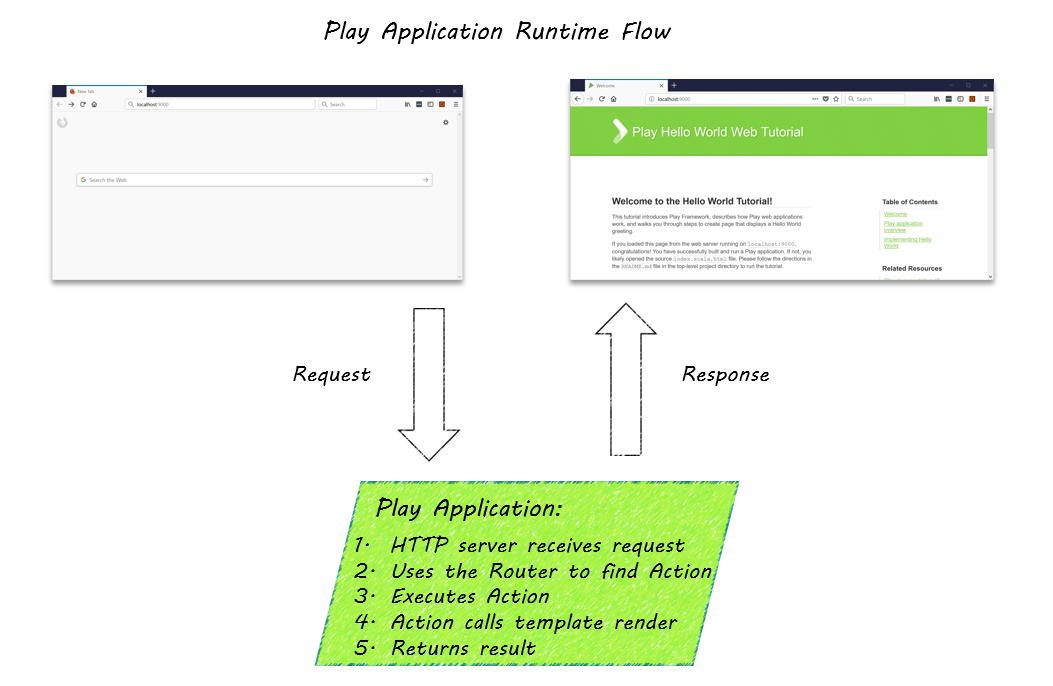
Let's start by looking at what happens at runtime. When you entered the server name and port number, http://localhost:9000/, in your browser:
- The browser requested the root
/URI from the HTTP server using theGETmethod. - The Play internal HTTP Server received the request.
- Play resolved the request using the
routesfile, which maps URIs to controller action methods. - The action method used Twirl templates to render the
indexpage. - The HTTP server returned the response as an HTML page.
At a high level, the flow looks something like this:
Explore the project
Next, let's look at the tutorial project to locate the implementation for the following:
- The controller action method that defines how to handle a request to the root URI.
- The
conf/routesfile that maps the request to the controller method. - The Twirl template that the action method calls to render the HTML markup.
Using a command window or a GUI, start with the top-level project directory. The following directories contain application components:
Note: When changing directories in Windows shells, substitute/for\in path names.
- The
appsubdirectory is where you put your Scala code and packages. It contains directories forcontrollersandviews, which will be familiar to those experienced with the Model View Controller (MVC) architecture. Since this simple project does not need an external data repository, it does not contain amodelsdirectory, but this is where you would add it. You could also add aservicepackage andutilshere. - The
publicsubdirectory contains directories forimages,javascripts, andstylesheets. - The
confdirectory contains application configuration. For a more detailed explanation of the project's structure, see Play Application Layout. -
To locate the controller action method, open
app/controllers/HomeController.scalafile with your favorite text editor.The
Homecontrollerclass includes theindexaction method, as shown below. This is a very simple action method that generate an HTML page from theindex.scala.htmlTwirl template file.def index() = Action { implicit request: Request[AnyContent] => Ok(views.html.index()) } - To view the route that maps the browser request to the controller method, open the
conf/routesfile.A route consists of an HTTP method, a path, and an action. This control over the URL schema makes it easy to design clean, human-readable, bookmarkable URLs. The following line maps a GET request for the root URL
/to theindexaction inHomeController:GET / controllers.HomeController.index - Open
app/views/index.scala.htmlwith your text editor.The main directive in this file calls the main template
main.scala.htmlwith the string"Welcome"to generate the page. You can openapp/views/main.scala.htmlto see how aStringparameter sets the page title.
Next steps
With this overview of the tutorial application, you are ready to add your own "Hello World" greeting.